Referral codes are URLs that allow you to track, measure, and evaluate your TurboVote engagement efforts. You can use referral codes in social media posts, newsletters, web pages, and more. They work whether you use a TurboVote destination site or embed TurboVote on your own site.
Why are referral codes useful?
Referral codes are useful for understanding user behavior and refining your outreach strategies. By adding referral codes to your custom TurboVote URLs, you can easily track which posts generate the most engagement and convert new users.
For example, you can identify the number of TurboVote signups originating from a single social media post by giving it a distinct referral code. All users who sign up through the social media post will be associated with the referral code in the User Export.
When you don’t use a referral code, users who sign up after clicking your standard partner URL in a social media post will still count toward your total TurboVote signup count, which can also be accessed via your Admin Console. But since there is no referral code, you won’t be able to identify how many of your total users sign up through this particular post versus your other engagement efforts.
By using distinct referral codes for each tactic you use to promote your site to your audience, you can identify which forms of outreach are most effective and which ones need improvement.
How do I create a referral code for a TurboVote destination site?
Creating your own referral code is easy! This guidance applies ONLY to TurboVote destination sites (e.g., example.turbovote.org).
Step 1: Use your custom TurboVote URL (e.g., example.turbovote.org).
Step 2: Add ?r= immediately following the URL.
Step 3: Add a unique identifier immediately following ?r=. The identifier should be short but descriptive to help you keep track of the outreach tactic the link is associated with.
- Use only letters, numbers, and dashes in identifiers.
- Keep codes under 100 characters.
- Do not use spaces.
- Keep a list of the unique identifiers you have used for future reference.
Step 4: This is an optional step for those who want to create referral links for Spanish speakers. Add &lang=es to the end of the English link, immediately following the unique identifier.
- English: example.turbovote.org/?r=canvas
Once you’ve created your referral code, use the full URL in your social media post, email, website banner, or other promotion to track engagement.
TurboVote destination site examples
| TurboVote Experience | Referral Code Examples (TurboVote Site URLs ONLY) |
| Voting Hub | example.turbovote.org?r=mktg-email-november |
| Voter Registration Assistance | example.turbovote.org/register-to-vote/voter-info?r=voter-reg-drive-3 |
| Check Your Registration | example.turbovote.org/check-your-registration/voter-info?r=fall-newsletter |
| Preregister to Vote | example.turbovote.org/preregister/voter-info?r=chs-seniors-email |
| Get Election Reminders | example.turbovote.org/reminders/voter-info?r=october-campaign |
| Request Absentee Ballot | example.turbovote.org/request-ballot/voter-info?r=launch |
| What’s On Your Ballot? | example.turbovote.org/whats-on-your-ballot/voter-info?r=education-campaign |
| State Hub | example.turbovote.org/how-to-vote/ca?r=spring-fling |
| Election Guide | example.turbovote.org/elections/tn/2026-11-03?r=instagram-story-4 |
How do I create a referral code for a site embedding TurboVote?
You can create a referral code in a few simple steps! This guidance applies ONLY to sites that embed TurboVote (e.g., https://demoturbovote.org/example).
TurboVote embed code includes the placeholder referral code tvhub by default. However, you can use Embed Page Transport URLs to override the default referral code, as well as update the page path and other query parameters.
If you are only overriding the default referral code, append ?tv-r= and a unique identifier at the end of the URL. If you are updating the path and/or appending multiple parameters, use ?tv- for the first parameter and &tv- for subsequent parameters.
The identifier should be short but descriptive to help you keep track of the outreach tactic the link is associated with. Use only letters, numbers, and dashes in identifiers. Do not use spaces. Keep a list of the unique identifiers you have used for future reference.
| TurboVote Experience | Referral Code Examples (TurboVote Embed URLs ONLY) |
| Override the default referral code on a page with an embedded Voting Hub or signup experience | |
| Change the page path and override the default referral code |
https://demoturbovote.org/example?tv-p=/register-to-vote/voter-info&tv-r=voter-reg-drive-3 https://demoturbovote.org/check-registration?tv-p=/elections/tn/2026-11-03&tv-r=instagram-story-4 |
| Change the page path, update the default referral code, and load TurboVote in Spanish | https://demoturbovote.org/example?tv-p=/request-ballot/voter-info&tv-r=competition&tv-lang=es |
Use the full URL in your social media post, email, website banner, or other promotion to track engagement.
Using referral code data
You can now track user engagement with your referral codes in the Dashboard section of the Admin Console, without downloading a full User Export! Simply log in to your Admin Console account, and scroll down to the referral code tiles in the bottom left of your Dashboard.
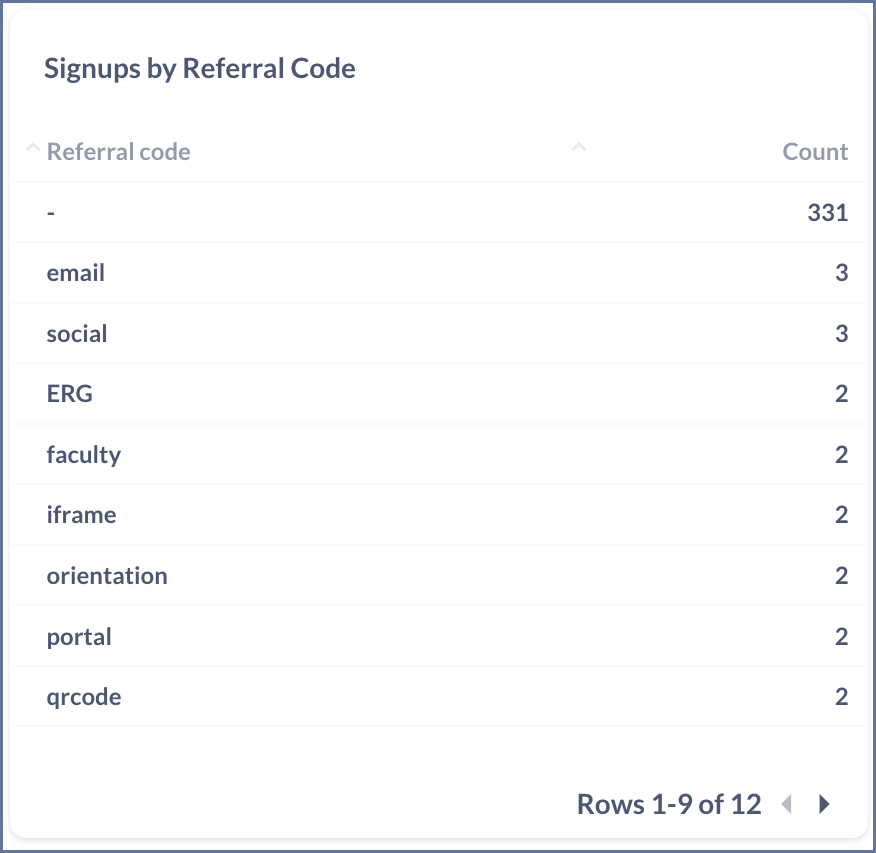
The first tile displays the number of signups associated with each of your referral codes. The second presents the number of active users for each code. The rows in the tiles are ordered high-to-low by number of signups and active users, respectively. The line labeled “-” includes all users who don’t have a referral code attached to their signup.
 |
 |
| The Signups by Referral Code tile displays the number of signups associated with each of your referral codes. | The Active Users by Referral Code tile displays the number of Active Users associated with each of your referral codes. |
The tiles display nine referral codes at a time, but you can use the arrows in the bottom right to scroll through any of your codes with at least one signup or active user. You can also download all the data in a tile by clicking the cloud icon in the top right. This will allow you to use the data in your own visualizations or reporting.
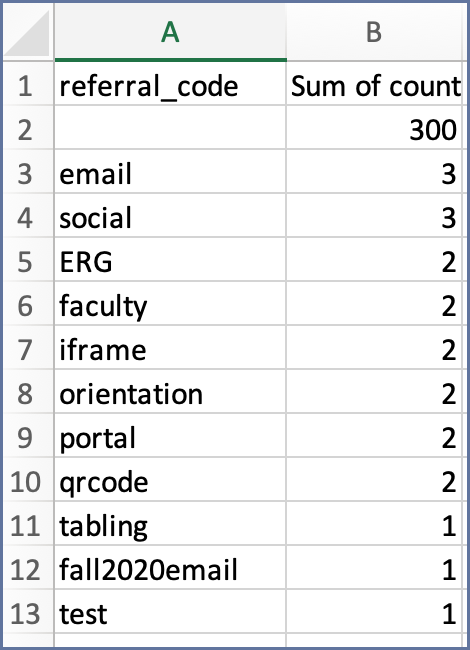 |
| Here is an example downloaded file from the Signups by Referral Code tile. Your file will list all of the referral codes with at least one Signup on your TurboVote site. The top row accounts for all Signups not associated with any referral codes. You can then create your own table or data visualizations with this information. |
You can use the filters at the top of the Dashboard page to filter the information in your referral code tiles by date, hostname, or state. Visit the Admin Console section to learn more about how these filters work.
You can also still view referral code data in the User Export, if you have access to individual-level data in your Admin Console account. Just navigate to the User Export section of the Admin Console, and download your csv file. The column labeled “referral-code” will list a code for any users who signed up with one.
This method of checking your referral code data will be helpful if you wish to view individual-level information for the users who signed up with a code, or if you want to filter referral code users by parameters other than date, hostname, or state. Remember to reference the TurboVote Data Dictionary to help you work with the User Export, and feel free to reach out to your program support contact if you have any questions!
 |
| In this screenshot, you can see two users who signed up for TurboVote via the GOTV referral link (“GOTV” appears in their rows in the “referral-code” column), and two who did not use the referral link (the “referral-code” column is blank for their rows). |